This document provides an overview and guide for the shared Kubernetes (k8s) cluster running on GCP in our hub and spoke project setup. The cluster resides in the hub project and is accessible by all development teams / working groups from their respective spoke projects through the shared Virtual Private Cloud (VPC).
Gateway API Setup
Our project utilizes the Kubernetes Gateway API, which represents the next generation of Kubernetes Ingress, Load Balancing, and Service Mesh APIs. It's designed to be generic, expressive, and role-oriented1. The core idea of the setup is visualized in this diagram well by Google:
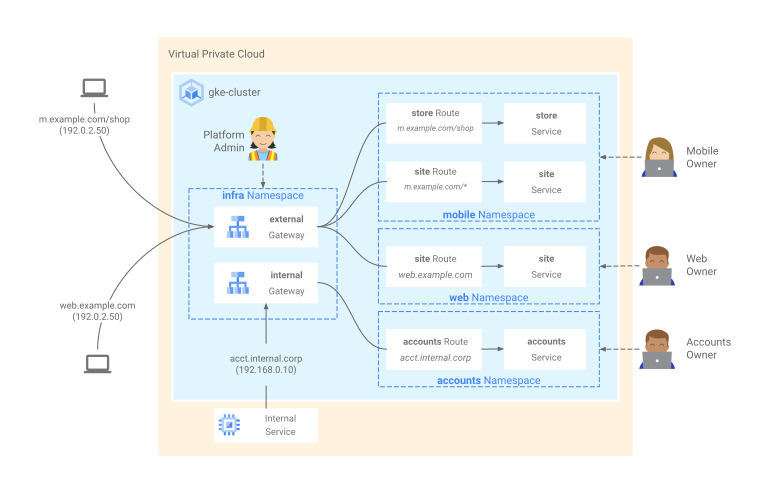
Components
1. External DNS
We've configured External DNS to work with Gateway API resources:
external-dns:
  provider:
    name: google
  extraArgs:
    - --source=gateway-httproute
  rbac:
    additionalPermissions:
      - apiGroups: ["gateway.networking.k8s.io"]
        resources:
          [
            "gateways",
            "httproutes",
            "grpcroutes",
            "tlsroutes",
            "tcproutes",
            "udproutes",
          ]
        verbs: ["get", "watch", "list"]
      - apiGroups: [""]
        resources: ["namespaces"]
        verbs: ["get", "watch", "list"]
This configuration allows External DNS to manage DNS records based on Gateway API resources, particularly HTTPRoutes.
2. Cert Manager
We've enabled Cert Manager to work with Gateway API:
cert-manager:
  config:
    enableGatewayAPI: true
This allows Cert Manager to provision and manage TLS certificates for Gateway resources2.
Example: Whoami Service
We've set up a simple "whoami" service to demonstrate the use of Gateway API:
kind: HTTPRoute
apiVersion: gateway.networking.k8s.io/v1beta1
metadata:
  name: whoami-route
spec:
  parentRefs:
    - kind: Gateway
      name: external-http
  hostnames:
    - "whoami-test.platform.dev.everycure.org"
  rules:
    - backendRefs:
        - name: whoami
          port: 80
This HTTPRoute resource:
- Associates with a Gateway named "external-http"
- Routes traffic for the hostname "whoami-test.platform.dev.everycure.org"
- Directs traffic to the "whoami" service on port 80
Key Concepts
- GatewayClass: Defines a set of Gateways with a common configuration and behavior.
- Gateway: Describes how traffic can be translated to Services within the cluster.
- HTTPRoute: Describes how HTTP requests should be routed by a Gateway.
Our setup leverages these concepts to provide a flexible and powerful routing solution.
Additional Resources
- Using Gateway for Ingress: https://gateway-api.sigs.k8s.io/guides/
- External DNS & Gateway: https://kubernetes-sigs.github.io/external-dns/v0.13.1/tutorials/gateway-api/
- Cert Manager Configuration:
- ACME: https://cert-manager.io/docs/configuration/acme/
-
Cert Manager and Gateway: https://cert-manager.io/docs/usage/gateway/
-
Gateway API on GKE:
- How it Works: https://cloud.google.com/kubernetes-engine/docs/concepts/gateway-api
- Securing with IAP: https://cloud.google.com/kubernetes-engine/docs/how-to/secure-gateway
Deploying applications to the cluster
Service Deployment Configuration
Services are deployed to the cluster using Helm charts. The default configuration provisions services on nodes with a maximum capacity of 32 GB RAM, managed through taints and node selectors.
For services requiring larger compute resources (e.g., >32 GB RAM), explicit taint tolerations must be configured in the Helm chart. This ensures proper scheduling on nodes with the required capacity.
Implementation Examples
Reference implementations for high-memory workloads can be found in:
gke.tf: Infrastructure configurationpipelines/matrix/templates/argo_wf_spec.tmpl: Pipeline node configuration
For instance, our pipeline nodes require 64 GB RAM and demonstrate the necessary taint toleration configuration.
Using the cluster for Spark processing
Warning
not yet implemented, volunteers welcome
Using the cluster for ray processing
Warning
not yet implemented, volunteers welcome
Access and Permissions
Submitting workflows
We enabled Google Groups RBAC for the Argo workflows application. Access to Argo Workflows is managed through Google Groups, specifically:
- The cluster is configured with Google Groups for RBAC using the security group
gke-security-groups@everycure.org - Argo Workflows access is granted to:
- Individual users (can be added in the configuration)
- Members of the
techteam@everycure.orgGoogle Group
The configuration is managed in the values.yaml file for the developer-iam argo application:
argo:
  namespace: argo-workflows
  rbac:
    users:
      # add new users here that should be able to submit workflows
      #- user@example.com
    groups:
      - techteam@everycure.org
To request access to submit workflows:
- Ensure you are a member of the
techteam@everycure.orgGoogle Group - For individual access, request to be added to the
userssection in the configuration (should rarely be needed)
For more details on Google Groups RBAC setup, refer to the official documentation.
Administering the cluster
We will provide roles/container.developer to everyone in the MATRIX project that should be able to administer the cluster.
Accessing applications running on the cluster
We expose the applications via web-based interfaces, which are accessible via the web browser. Those that should not be accessible to the public are protected by IAP. See the google docs for more details.
Cluster Configuration
Cluster Setup
The shared Kubernetes cluster is hosted in the hub project. Key configuration details include:
- Region:
us-central1(by default) - Node Pools: Configured with autoscaling enabled
- Network: Shared VPC
- GPU nodes: Currently not enabled but planning to add these as scale to 0 autoscaling group
Networking
Networking between the hub and spoke projects leverages a shared VPC:
- VPC Name:
matrix-hub-dev-nw - Subnets: one per region, e.g. EU and US
- Firewall Rules: Configured to allow necessary communication between the hub and spoke projects as well as outgoing HTTPs and incoming SSH via GCP IdP
Secrets
We set all secrets in our cloud_secrets terraform module by grabbing our encrypted yaml file from the disk and creating cloud secrets for each of them.