GCP CloudBuild
Rationale
This document outlines the working of GCP CloudBuild in our project. We introduced CB because we saw a need to replace our Github Actions for Open Sourcing our Infra code.
Special Note
We would need to run terragrunt run-all apply the first time, as this would require boostraping the SA etc as we are using gitcrypt and it would be needed to be stored in Google Secret Manager.
GCP Projects invovled:
At the time of writting, these GCP projects are invovled:
- Matrix Hub Dev (mtrx-hub-dev project)
- Matrix Hub Prod (mtrx-hub-prod project)
- Workbench 2 (mtrx-wg2-modeling-dev)
Deployment Flow
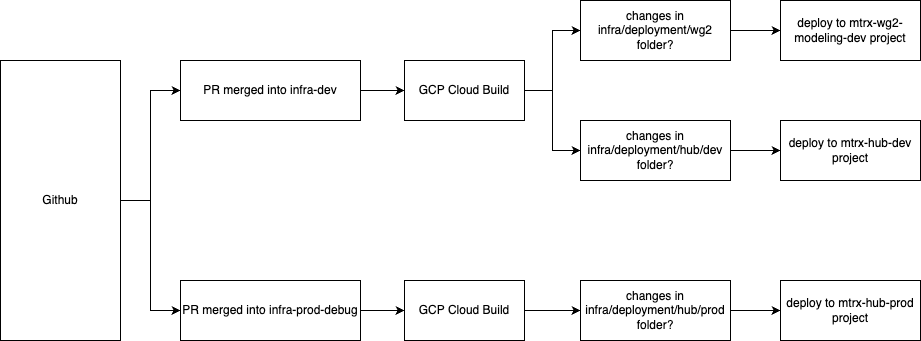
GCP Cloud Build runs when the following conditions are met. This is detailed in the Workflow Diagram.
Important Variables
The variables required to terraform the module cloudbuild is:
| Name | Description | Type | Example |
|---|---|---|---|
project_id |
The GCP project ID. | string | "my-gcp-project" |
github_app_installation_id |
The GitHub App installation ID. More info: Google Cloud Docs | string | "12345678" |
github_repo_owner |
The owner of the GitHub repository. | string | "my-org" |
github_repo_name |
The name of the GitHub repository. | string | "my-repo" |
github_repo_token |
The Personal Access Token. | string | "ghp_xxxxxxxxxxxxxxxxxxxxxx" |
github_repo_deploy_branch |
The branch to listen to for deployment. | string | "main" |
github_repo_path_to_folder |
Path to folder with Terraform files. | string | "infrastructure/environments/prod" |
location |
GCP region to deploy resources in. | string | "us-central1" |
gitcrypt_key |
The gitcrypt key to unlock the secrets repository. | string | "BASE64_ENCODED_KEY" |
slack_webhook_url |
Slack webhook URL for notifications. | string | "https://hooks.slack.com/services/..." |
Key Features Introduced
1. CloudBuild Integration
- Purpose: Automates deployments using Google CloudBuild.
- Implementation:
- Added CloudBuild modules in
main.tffiles fordev,prod, andwg2environments. - Parameters include GitHub repository details and Slack webhook URLs.
- Resources Created
- Github Connection to GCP CloudBuild (connectionV2.tf)
- IAM SA account and related permissions to deploy terraform (iam.tf)
- create necessary secrets such as GitCrypt and Github Token needed for proper working (secret.tf)
- Create the Trigger and Build steps for terraform apply (trigger.tf)
2. Slack Notifications
- Purpose: Sends deployment status updates to Slack channels. We could not implement the Slack Webhook as an additional step in Cloud Build because there is no native way to conditionally run a step only when a previous step fails. Instead, we implemented a Pub/Sub-based notification model, as recommended in the official Cloud Build documentation: Configure Slack Notifications.
- Implementation:
- We are using an offical image for the Cloud Run Slack Notifier. The image is:
us-east1-docker.pkg.dev/gcb-release/cloud-build-notifiers/slack:latest. (Modifiable throughslack_notifier/rvariables.tf). - Added
slack_webhook_urlinputs interragrunt.hclfiles. - Ensures notifications are sent for deployment failures or timeouts. (Modifiable through
slack_notifier/rvariables.tf). - Resources Created
- Bucket to store the config yaml and slack JSON file. (bucket.tf)
- Cloud Run to send the notifications to slack, it listens for messages from Pub/Sub (
slack_notifier/cloud_run.tf) - Pub/Sub Topic that listens to cloud build status and cloud run as it's subscriber (
slack_notifier/pub_sub.tf) - Service Account and permissions for cloud run to access secret (sa.tf)
- Slack Webhook URL stored in secrets (secret.tf)
Notes for Future Developers
- CloudBuild Module:
-
The CloudBuild module is central to deployment automation. Ensure the parameters (
project_id,github_repo_token, etc.) are correctly configured for new environments. -
Slack Integration:
-
Slack notifications are configured using
slack_webhook_url. If the webhook URL changes, update theterragrunt.hclfiles accordingly. -
GitHub Authentication:
- The workflow relies on GitHub tokens (
github_classic_token_for_cloudbuild). Ensure these tokens are securely stored and rotated periodically. (Need future work)