Automated Release Workflow
Overview
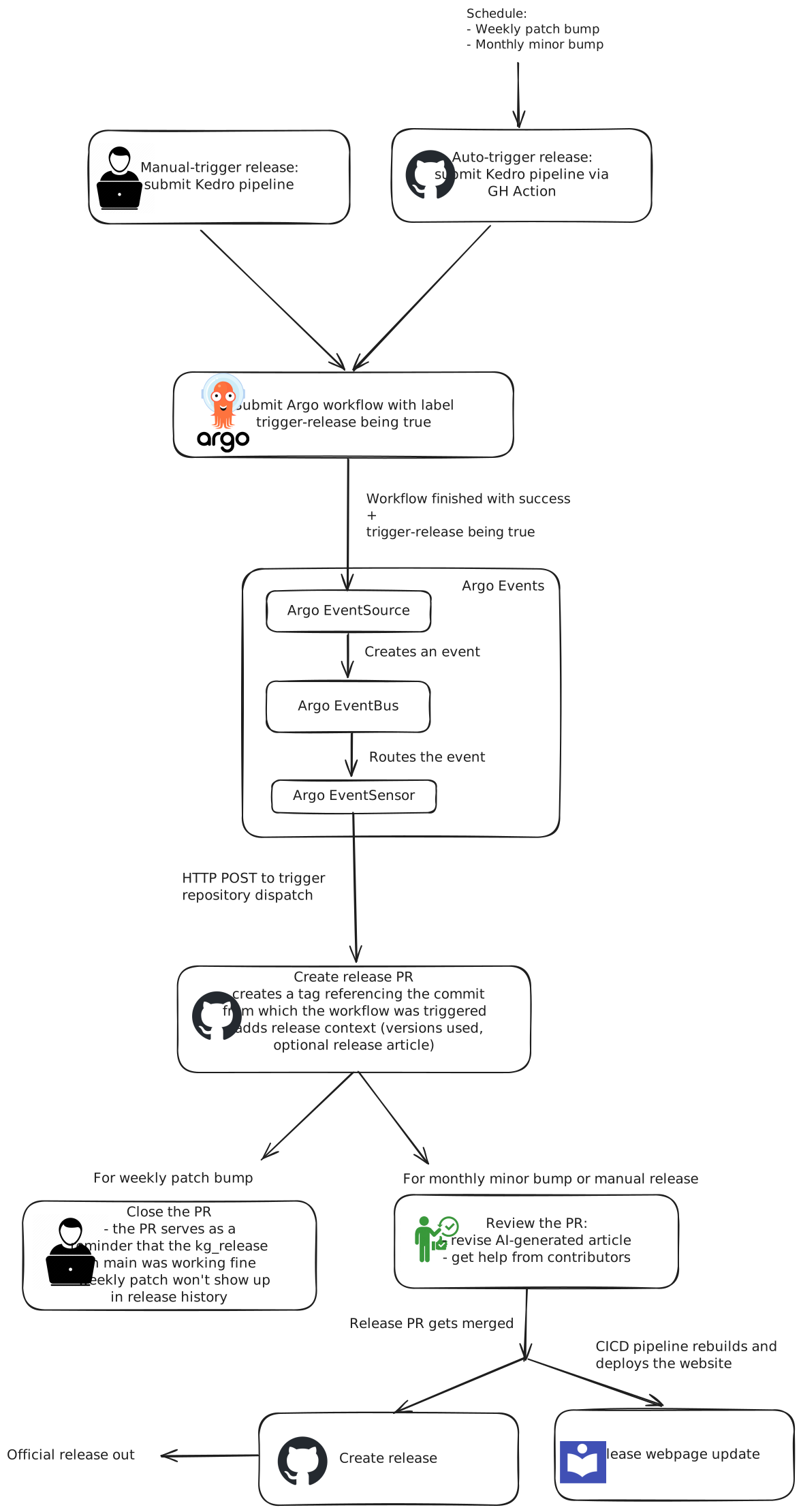
The workflow automates the release process of a data-release/kg-release pipeline, allowing for both manual and scheduled triggers. It ensures seamless integration with GitHub Actions and Argo workflows while managing versioning and release updates efficiently.
Triggering Mechanisms
There are two ways to trigger a release:
- Manual Trigger
A person manually triggers a pipeline encompassing the data-release pipeline by running a kedro CLI command from their local machine. You can find more information in this runbook 2. Auto-Trigger via GitHub Actions
The release is automatically triggered based on a schedule:
- Weekly: the "patch" version is increased (aka a "patch bump")
- Monthly: the "minor" version is increased (aka a "minor bump")
Workflow Execution
Regardless of the trigger type, the process follows these steps:
- Submit Argo Workflow
- The Argo workflow is rendered and submitted.
- Argo Events Creation and Routing
- Once the workflow is finished, Argo EventSource creates a data-release event.
- Argo EventBus manages and routes the event.
- Trigger Repository Dispatch
- Argo EventSensor listens for the event and sends an HTTP POST request to trigger the repository dispatch.
Creating the Release Pull Request
Once the repository dispatch is triggered:
- A release PR is created via GitHub Actions.
- The GitHub action executes:
- Tagging: A tag referencing the commit from which the workflow was triggered.
- Generating release context, including release context json file and an optional release article, which are added to the PR.
- Deploying the KG dashboard: The KG dashboard is deployed with the new release version.
PR Handling
- For Weekly Patch Bumps:
- The PR is closed: it only serves as a reminder that the
kg_releasepipeline on the main branch was working fine. -
Weekly patches do not appear in the Release History since the release context json file is not merged into
main. -
For Monthly Minor Bumps & Manual Releases:
- The PR is reviewed: the AI-generated article is revised.
- Once approved, the PR is merged.
Creating a Release
Once the release PR is merged: - The official release is created in GitHub via GitHub Actions. - The CI/CD pipeline rebuilds and deploys the website to update the release webpage.